
Your till knows what you sold. Your cameras know what happened.
Caffelytics counts arrivals, queues and table turns from the cameras a café already has. No video leaves the building.
Early accessas of Free three-week, one-camera pilot open
Caffelytics
- Languages
- None · images and video
The owner gets six screens: dashboard, live view, spaces, history, alerts and calibration.
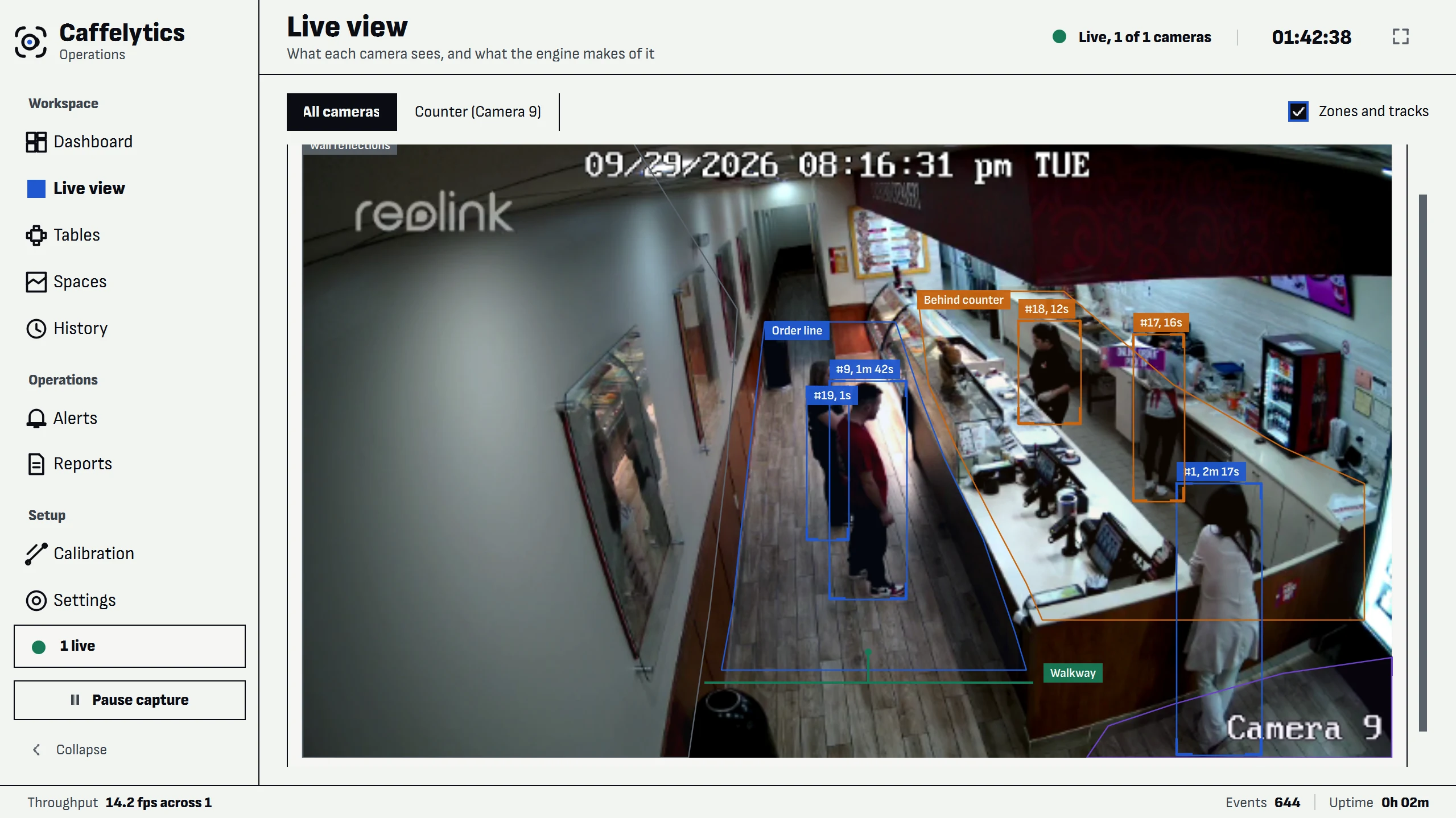
Caffelytics counts. It never scores your staff.
What it handles
- Counts entries and exits across a line drawn on the camera image.
- Tracks queue length, the longest wait, and people who leave before the counter.
- Logs sittings per table, usage share and time to clear.
- Shows density, movement and waiting zones as heat maps over the camera view.
What it hands to a person
- Staffing and seating decisions stay with the owner, made from the data.
- No facial recognition, identity matching, emotion detection or individual staff scoring.
- Each camera states what it can and cannot measure yet, on screen.
Caffelytics is one application on one in-store PC.
Specification
- Languages
- None: it works on images and video, not speech
- Integrations
- Network cameras · NVR channels · USB cameras · MJPEG streams · video files
- Deployment
- In-store Windows PC · up to four cameras
- Data handling
- Video is processed on site and never stored in the database. Retention is set in settings, with deletion on demand. The only optional outbound data is a written daily summary of totals, which can be switched off
- Alert evidence
- Snapshots in a folder capped at 200 MB
The pilot is free. Pricing after it is shared on request.
Open the pricing sheetWhat sets the price
- Cameras (up to four)
- Locations
- Retention period
- Installation support
Five questions buyers ask about Caffelytics, answered plainly.
Do I need new cameras?
No. It reads the network cameras, recorder channels, USB cameras, MJPEG streams or video files you already have. Setup is drawing zones and lines on the camera image; no floor plan is needed.
Does it recognise faces?
No. There is no facial recognition, identity matching, emotion detection, continuous recording or individual staff scoring, and no video is stored in the database. People appear only as anonymous numbers.
Does any video leave the building?
No. Video is processed on site. The only thing that can leave is a written daily summary of totals, which you can switch off; the daily report also works offline.
How do I know the counts are right?
Live view overlays what the engine detects on the video, so you can see a miscount as it happens. Each camera also states on screen what it can and cannot measure yet.
What does it cost?
The three-week pilot on one camera is free, with every feature. Pricing for continued use is shared after the pilot, based on cameras and locations.